CouponF5 is an independent publisher. We may earn a commission when you purchase through our links, at no extra cost to you. Merchant terms apply.

In this guide

Hawk Host
Hawk Host Turbo Shared Web Hosting — Black Friday 2026
Black Friday 2026: Turbo hosting from $5.88/mo equivalent on a 12-month prepaid term ($70.51 due upfront). 1-, 2- and 3-year options, 70GB NVMe, 4…
Hawk Host semi-dedicated hosting is worth considering when a growing WordPress or business site needs more predictable account resources than entry-level shared hosting but you do not want to manage a VPS. The merchant’s current semi-dedicated comparison presents three tiers—Turbo, Ultra and Max—with dedicated IP addresses, cPanel and progressively larger CPU, memory, disk and I/O allowances. The important buying decision is not simply which plan has the most resources: it is whether your current bottleneck justifies the upgrade and what you will actually pay at renewal.
What does “semi-dedicated” mean at Hawk Host?
In this context, semi-dedicated is a hosting product category that assigns a larger set of account resources than a basic shared tier while retaining a managed, cPanel-style environment. It is not the same as leasing an entire physical server, and the service should not be treated as a dedicated-server guarantee. The merchant lists cPanel, LiteSpeed, SSL certificates, free migrations, daily offsite backups and multiple site-management tools on its semi-dedicated page. Those are published service features, not the results of an independent hands-on performance test.
For many US site owners, the appeal is operational simplicity. You can continue to manage domains, email and site files from a familiar panel instead of administering operating-system patches, server security and all underlying web services yourself. However, application tuning, resource limits, backups and the fine print of the host’s policies still matter.
Turbo vs. Ultra vs. Max: compare the actual limits
Hawk Host’s published comparison gives Turbo 70GB NVMe storage, four CPU cores, 5GB RAM and 200MB/s disk I/O. Ultra increases those figures to 100GB, six cores, 8GB and 250MB/s. Max provides 130GB, eight cores, 10GB and 300MB/s. Each of these tiers lists a dedicated IP address. The same chart shows process limits of 250, 300 and 350, respectively, and inode allowances of 3 million, 4 million and 5 million.
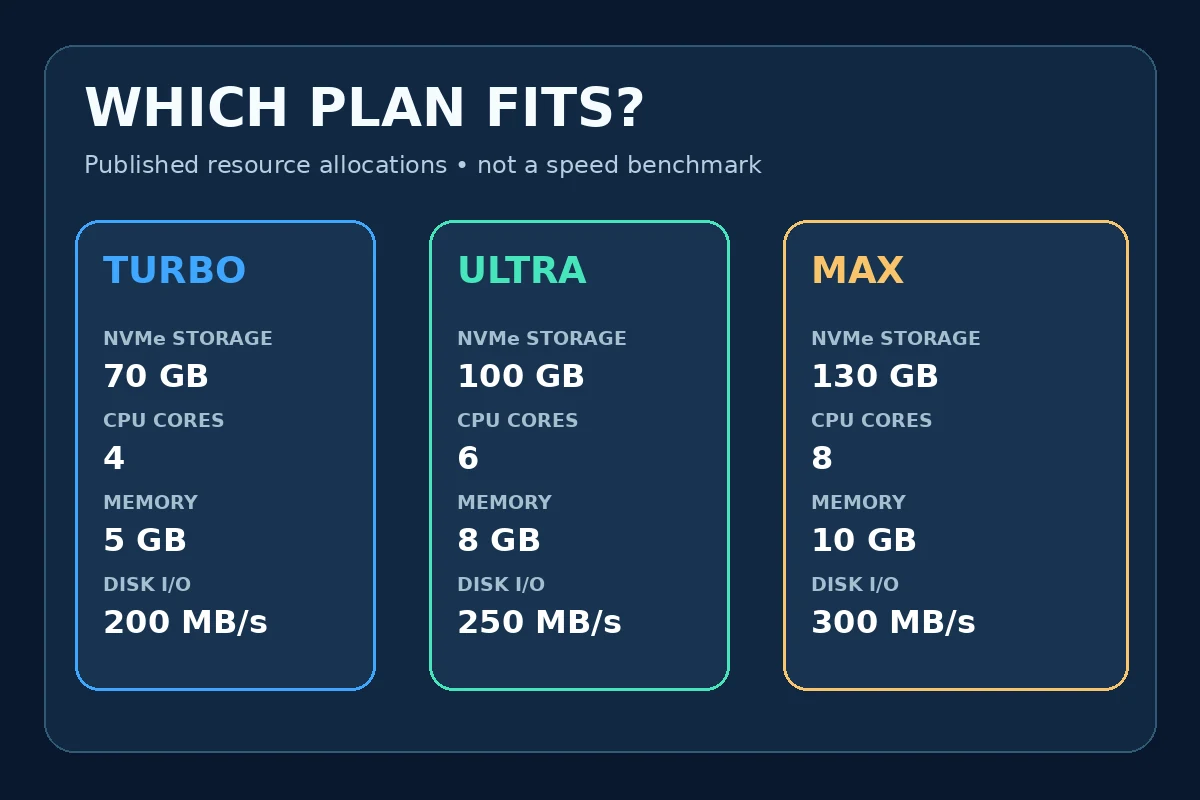
These specifications help determine which plan has headroom for your site, but they are limits, not predicted page-load times. More cores do not automatically fix a slow database query, an unoptimized theme, oversized images or a poorly configured cache. Examine your real usage reports—CPU throttling, memory pressure, concurrent processes, storage and peak traffic—before deciding to move up a tier.
Which Hawk Host semi-dedicated plan should you choose?
Turbo: Start here if your site has outgrown an entry-level plan and you need more account resources, but your actual resource history does not indicate a need for the higher tiers. Its 70GB NVMe, four cores and 5GB RAM may be ample for smaller business sites and content projects with sensible caching. Ask support about migration requirements and workload suitability if your usage is unusual.
Ultra: The middle tier makes sense when measured traffic spikes, plugins or several applications consistently consume more RAM or CPU than Turbo allows. It offers meaningfully more memory and storage without going straight to the largest plan. It is not automatically the best value unless those extra allocations meet a demonstrated need.
Max: Consider the largest listed tier if your account genuinely needs its eight CPU cores, 10GB memory, higher I/O and 130GB storage. At that point, compare the ongoing semi-dedicated price against managed VPS or other hosting architectures. A larger shared-resource account is not interchangeable with a VPS that offers control over system-level software and isolation.
How to read the promotional price and renewal charge
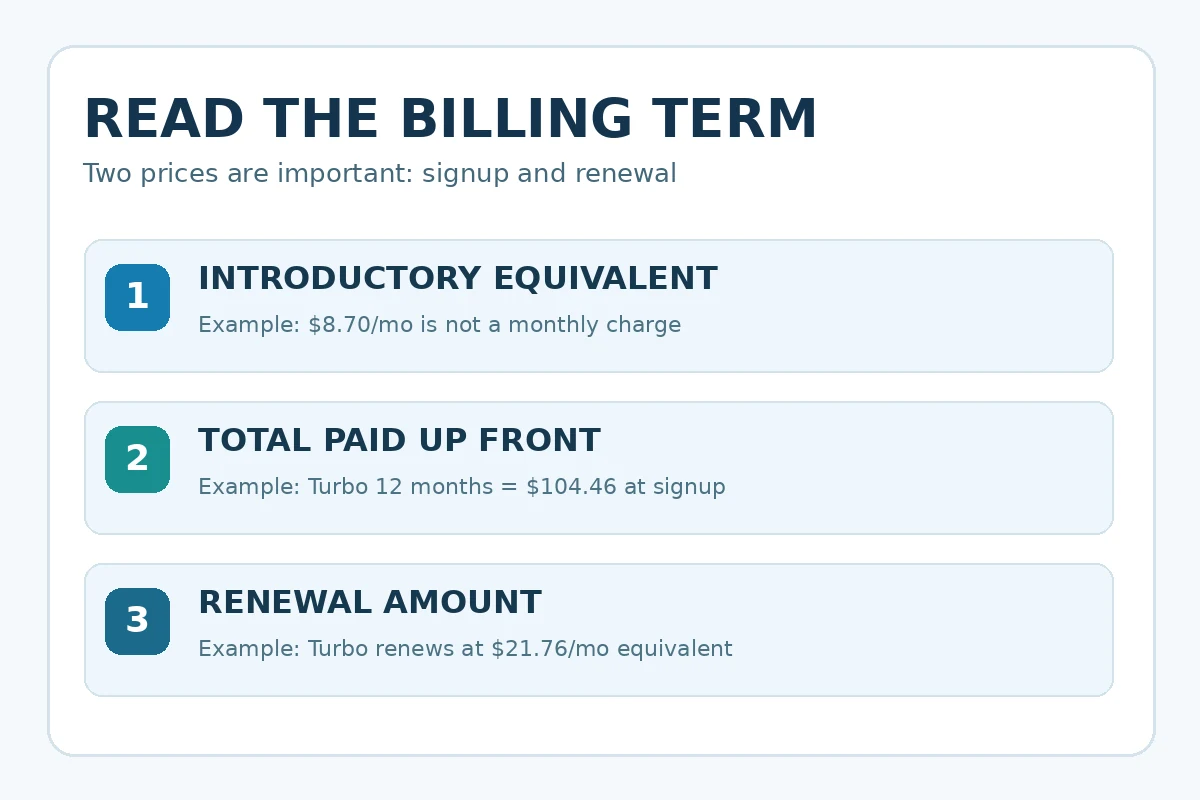
The page publishes monthly, one-year, two-year and three-year billing choices. An amount shown as “per month” under a prepaid term is generally a monthly equivalent; the buyer pays the full term up front. Promotional price and regular price must be compared within the same term. A one-year introductory deal should not be compared against the standard month-to-month price as though the billing arrangements were identical.
For example, one retrieved version of the official page listed Turbo at $8.70 per month equivalent for 12 months, totaling $104.46 for the initial year, versus a stated regular $261.15 for that annual term. In that same version, Ultra showed $13.93 per month equivalent with a $167.16 first-year total; Max showed $18.28 per month equivalent with a $219.41 initial-year total. These are time-specific page observations, not guaranteed offers for every future checkout: other indexed versions of Hawk Host’s own page show different promotional combinations.
Instead of trusting a price snapshot, make the actual order form your final reference. Verify the selected tier, number of months, total due today, introductory discount, renewal amount, tax and any added services. The site’s separately published hosting prices table can help compare totals, but checkout remains the relevant transaction-specific confirmation.
What about the included WordPress and security tools?
Hawk Host lists Softaculous one-click installation, WordPress tools, LiteSpeed and LSCache-related support, Memcached and Redis on its feature comparison, along with SSL and proactive malware scanning. It also advertises daily offsite backups and free migration assistance. These can reduce setup effort, but do not eliminate maintenance work: keep plugins updated, test restores, use strong authentication and verify that critical site data is included in backups.
The merchant also states a 99.9% uptime service-level guarantee. An SLA is a contractual commitment subject to its published terms, not independent evidence that every customer’s website achieves the same availability. If uptime matters for revenue, review the actual SLA exclusions, the applicable credit process and how monitoring is measured.
Semi-dedicated hosting vs. shared hosting vs. a VPS
Choose standard shared hosting if usage is modest, the site is easy to cache and the account has ample headroom. Consider semi-dedicated when repeated resource limits—not merely curiosity about a “faster” plan—justify paying for more capacity while keeping managed cPanel hosting. Choose a VPS or managed cloud server when you need a different operating system or software stack, root-level control, distinct isolation requirements, or resources that make a shared-style account uneconomical.
The trade-off is operational: VPS plans can be highly flexible, but unmanaged versions demand additional security administration, updates and monitoring. Hosting providers may offer managed options with different scopes. Compare the full support responsibilities, not just the CPU/RAM columns or the largest advertised introductory percentage.
A practical pre-purchase checklist
- Review current usage: Identify which metric actually hits its limit—CPU, RAM, disk I/O, processes, storage or inodes—and when.
- Choose a matching tier: Give yourself realistic headroom without paying for unused capacity.
- Check the billing term: Write down the signup total and the renewal total before entering payment details.
- Confirm migration scope: Ask whether email, databases, DNS, staging environments and custom settings are covered by the offered free migration.
- Review backup and support expectations: Clarify restore procedures, acceptable use and whether your application dependencies are supported.
- Plan a fallback: Know how you would scale, downgrade or export the site if needs change.

Bottom line: who should buy Hawk Host semi-dedicated hosting?
Hawk Host’s semi-dedicated plans are most relevant to website operators who already have evidence that a basic shared account is running out of resources and who value the simplicity of managed cPanel hosting. Turbo is the sensible starting comparison, Ultra adds substantial memory and CPU headroom, and Max is for more demanding workloads that still fit the shared-style service model. If your bottleneck is poor optimization, fix that first; if you need server-level control, compare a VPS instead.
Before choosing a plan, review the official Semi-Dedicated Hosting page and its live signup form for the exact price, billing cycle and renewal terms. This guide is based on published merchant documentation; we have not provisioned or benchmarked the servers ourselves.
Hawk Host
Hawk Host Turbo Shared Web Hosting — Black Friday 2026
Black Friday 2026: Turbo hosting from $5.88/mo equivalent on a 12-month prepaid term ($70.51 due upfront). 1-, 2- and 3-year options, 70GB NVMe, 4…