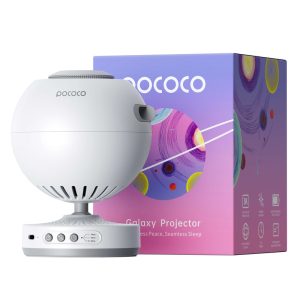
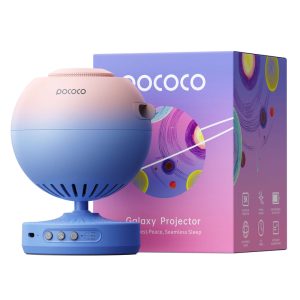
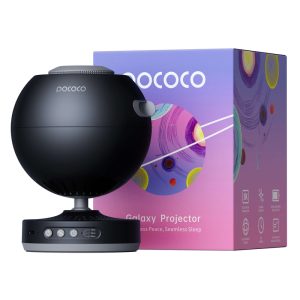
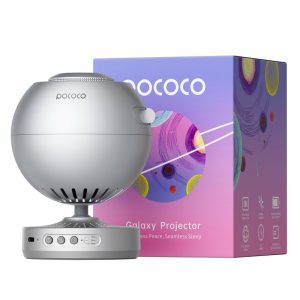
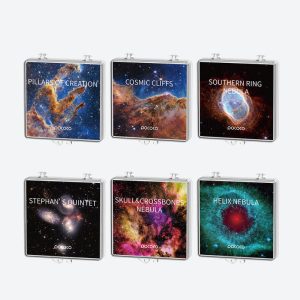
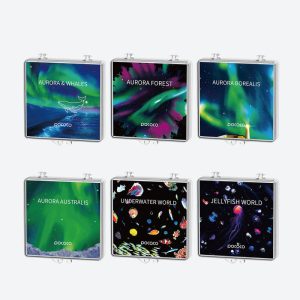
A closer look
About POCOCO
POCOCO sells a compact home galaxy projector and interchangeable themed projection discs that display stars, nebulae and other scenes across ceilings and walls. Its product range focuses on decorative room lighting, home-planetarium experiences and gift sets rather than conventional video projectors or astronomy telescopes.
POCOCO Galaxy Projector and accessories
The standard Galaxy Projector uses interchangeable projection discs. The official product listing describes a three-setting sleep timer, rechargeable lithium-ion battery, USB-C charging, an LED light source and a spherical body. The standard package lists one projector, two discs (Diamond Stars and Westerlund 2), USB-C cable, postcard and instruction poster. Manufacturer information gives dimensions of approximately 6.18 × 4.72 × 4.72 inches and a weight of 1.7 pounds.
POCOCO offers additional disc sets featuring planets, constellations, deep-sea scenes and nebulae, alongside projector bundles and gift editions. The imagery is meant for atmosphere and display; the product should not be confused with a scientific planetarium that identifies real-time celestial positions.
Shopping and price information
On November 25, 2026, the US storefront listed the standard Galaxy Projector at $99.99 versus $109.99 regular price. The 2026 Christmas Gift Set displayed $149.99 versus $189.99. Disc bundles and volume promotions are also offered; eligible items and totals can change. POCOCO advertises verified no-code sale prices and conditional promotional benefits, rather than a universally valid promo code.
US shipping, warranty and returns
The current shipping policy lists complimentary US delivery with estimated 7–15 business days in transit after shipment, plus typical 1–2-business-day processing. POCOCO publishes a two-year limited warranty for eligible purchases made directly at its store. For returns, contact support and obtain authorization. Defective items may qualify for remedy under stated conditions; change-of-mind returns require unused items and the customer pays return shipping. The warranty and service policy also lists sale items as nonreturnable, so shoppers buying discounted items should ask customer service to confirm applicable terms before ordering.
Who should shop here?
POCOCO is a relevant option for buyers who want disc-based ambient light with a rechargeable tabletop projector, visual variety and an expandable disc collection. It may not suit shoppers who want room-filling video projections, interactive star maps or verified clinical sleep benefits. The brand’s relaxation and wellness language is marketing, not independent proof of treatment outcomes.
Helpful information
How to apply POCOCO coupon codes
- Choose a POCOCO offer and read its conditions.
- Copy the code if one is provided, then visit POCOCO.
- Add eligible items and apply the code at checkout where available.
- Check the final total before paying.
How We Review Offers
We review the available offer information, including stated conditions and expiry details where provided. Offers can change, and a code may not apply to every order. Always check the merchant’s terms and final checkout total.
Affiliate Disclosure
CouponF5 is an independent publisher. We may earn a commission when you purchase through our links, at no extra cost to you. Merchant terms apply.
POCOCO Questions & Answers
Where can I find POCOCO coupons and promo codes?
Browse the POCOCO offers listed on CouponF5, then check the official store website for additional promotions. Compare the conditions and confirm the final price before ordering.
Will POCOCO discounts apply automatically at checkout?
It depends on the offer. Some deals apply automatically through the offer link, while others require a coupon code. Review the offer details and check that the discount appears before paying.
How do I apply a POCOCO coupon code?
Select Get Code to copy the code and open the store. Add eligible items to your cart, enter the code in the promo or discount field at checkout, and apply it. Confirm the discount before completing your purchase. For offers without a code, select Get Deal and follow the merchant’s instructions.
Which POCOCO offer should I choose?
Choose an offer that applies to your purchase and gives you the best final total. Compare minimum spending requirements, product exclusions, shipping costs, and customer eligibility rather than looking only at the discount percentage.
How often does POCOCO release new coupons?
There is no guaranteed schedule. Promotions may change during seasonal sales, product launches, or other events. Check the current listings and the official store website before shopping.
Why isn’t my POCOCO coupon code working?
Check that you entered the code correctly and that it has not expired. Your order may need to meet a minimum spend, include eligible products, or qualify for a particular customer or region restriction. Remove another applied code if necessary and review the merchant’s terms.
Can I combine multiple POCOCO coupon codes?
Combining codes depends on the merchant’s rules and the conditions of each promotion. Do not assume that multiple codes, sale prices, or other discounts can be used together. Check the terms and confirm which savings appear at checkout.
Are POCOCO offers limited to new customers?
Some offers may be restricted to first-time customers, while others may be available to returning shoppers. Check each offer for account, subscription, location, or purchase requirements before using it.
What if no POCOCO coupon codes are available?
You can check the official store for sale items, automatic discounts, bundles, or newsletter offers when available. A deal may provide savings without requiring a code. Compare the final total and avoid buying extra items solely to qualify for a promotion.